Page 18 of 65
Re: [Models] New created Models..
Posted: Sun Dec 30, 2012 7:00 pm
by undeaddemon
Humbled by your awesomeness!
Thanks for so much!
Re: [Models] New created Models..
Posted: Mon Dec 31, 2012 1:51 am
by germanny
undeaddemon wrote:Humbled by your awesomeness!
Thanks for so much!
Thx @all, hope i have time enogh..
Another one - mainly for Thomson, he found out how to set up an on-screen compass.
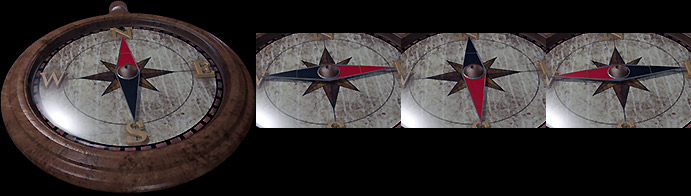
Download is here:
log_compass_img.7z
*EDIT* I see Thomson though about Eye of the Beholder. I added an example sequence^^

So, hurry up and make that damn compass work^^
Re: [Models] New created Models..
Posted: Mon Dec 31, 2012 2:18 am
by germanny
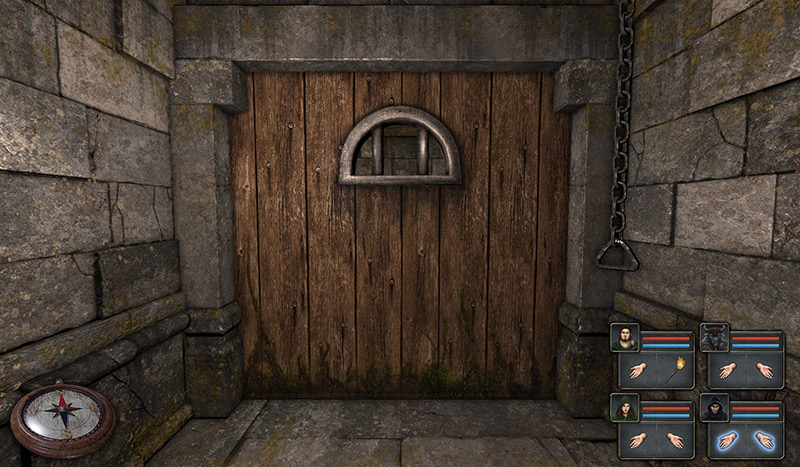
Playing w. Photoshop, is that a good position?
This is a screenshot from 1920x1200 - scaled.
Re: [Models] New created Models..
Posted: Mon Dec 31, 2012 11:01 am
by thomson
germanny wrote:Playing w. Photoshop, is that a good position?
Thanks a lot for the compass. There are some work-related things I need to complete today, so I'll likely upload updated compass early next year

(likely tomorrow).
I think your screenshot somewhat convinced me to put compass on bottom left corner. It looks cool in 1920x1200. The only thing against that position is that on lower resolution screen it may take too much screen space (compass image have fixed dimensions, so it does not scale down). That's why the default mode will likely be a toggle, so you can turn it on and off.
On the other hand, the alternative position could be top right. Sure, it will be obstructed when you open inventory or skills, but once you're doing something with your inventory, you don't typically need to navigate (the compass would be hidden under the stats/inventory window).
Re: [Models] New created Models..
Posted: Mon Dec 31, 2012 12:57 pm
by germanny
thomson wrote:germanny wrote:Playing w. Photoshop, is that a good position?
Thanks a lot for the compass. There are some work-related things I need to complete today, so I'll likely upload updated compass early next year
(likely tomorrow).
I think your screenshot somewhat convinced me to put compass on bottom left corner. It looks cool in 1920x1200. The only thing against that position is that on lower resolution screen it may take too much screen space (compass image have fixed dimensions, so it does not scale down). That's why the default mode will likely be a toggle, so you can turn it on and off.
On the other hand, the alternative position could be top right. Sure, it will be obstructed when you open inventory or skills, but once you're doing something with your inventory, you don't typically need to navigate (the compass would be hidden under the stats/inventory window).
No prob - relax, i just joking^^
If it is under the menu then this would fine. So the best position is topright!
But the it looks better if the compass is oriented to left. I´ll render out another ver.
I can attach two smaller versions, too.
Is it possible to read out the screen resolution within a script?
Re: [Models] New created Models..
Posted: Mon Dec 31, 2012 3:07 pm
by crisman
It's been a while since I read this post for the last time, and I've seen you are doing great stuff!!! I can't wait to try the DM wallset, it looks amazing!!!

Re: [Models] New created Models..
Posted: Mon Dec 31, 2012 3:38 pm
by Roman42
Wow, my Mod simply needs this compass! It's simply necessary in a random maze. Great work!
Re: [Models] New created Models..
Posted: Tue Jan 01, 2013 8:15 pm
by thomson
I've integrated images created by Germanny. Thanks! Result looks like this:
compass screenshot. Disclaimer: actual in-game screenshot. No photoshop was used to create this image
@Roman42: Feel free to grab sources from github (
https://github.com/xanathar/grimwidgets) and integrate grimwidgets into your mod. Currently the compass is in toggle mode, i.e. you can press c for it to appear and press again for it to vanish. You can tweak script called compass to suit your preference. This section is pretty self-explanatory:
Code: Select all
-- uncomment this to enabled/disable compass by pressing C
gw.setKeyHook('c', true, e.callback)

-- Uncomment this to show compass by pressing C
-- gw.setKeyHook('c', false, e.callback)

-- Uncomment this to have compass permanently visible
-- gw.addElement(e,'gui')
The compass image is fixed and does not scale with different resolutions. I'd like to hear your opinion about compass on screen position. Is bottom left corner ok?
Re: [Models] New created Models..
Posted: Tue Jan 01, 2013 10:11 pm
by Roman42
I think bottom left is perfect, but I would resize it. IMHO it should be as big as one character window, not 2. It's too dominant that way IMHO. Beautyful graphics and working perfectly.
EDIT: Sorry, I see in your image, that its exactly as big as I would imagine it. I'm playing on 1200x800, thats the problem.
Will resolution based resizing be part of the final version or is there a technical boundary?
Re: [Models] New created Models..
Posted: Tue Jan 01, 2013 10:15 pm
by Komag
with north on the slight angle it looks like it was designed to go on the right side.
